


We recently wrote a blog post about why it’s important to identify and have the keys to your website — in it we run through the most vital information to keep your digital platforms operating. Here, we’ve expanded on the housekeeping part — storing those keys somewhere safe.
To protect your website, your team members, and your organization, we recommend using a password manager. The benefit isn’t just security, but convenience too. A tool to store sensitive information can save time, precious headspace, and dozens of trees worth of insecure post-it notes.
Use a Password Manager
Passwords have rapidly evolved since the dawn of the internet, and passwords like “Password123” just don’t cut it anymore.
Keeping track of all your different accounts and logins is best done by a third-party service that gives all team members secure access, organizes accounts, and integrates with your browser.
We Recommend 1Password or Bitwarden
There are several password managers out there, with many similar features. At DevCollab we use 1Password (Clayton uses Bitwarden in his personal life and likes it!) — and for us, it’s a lot more than just a place to store passwords.
1Password and other password managers are tools that can be accessed via an app on your computer and a plugin in your browser. They are a simple and intuitive way to store and share passwords, licenses, credit card information, private links, and other important data.
In addition to storing passwords securely, these tools can include additional features to help streamline your organizational workflows. The information below is specific to 1Password, but most popular password managers have similar characteristics.
We’ve outlined some of the benefits and capabilities of using a password manager as well as some best practices to keep in mind when creating and storing information.
Avoid Creating Accounts with Personal Logins
Your website and organization require different accounts across different systems and services. It can be overwhelming to keep track of all those details through reorganizations and staffing changes, especially since many of these accounts are accessed only once a year.
To avoid this, we recommend always using an organizational, non-personal email to register your accounts, from your hosting account to your DNS and licenses. This allows you to retain control over your accounts during staff turnover.
For example, instead of using flastname@organization.org — use info@organization.org or accounts@organization.org.
Share Logins Securely
Never email passwords! Email is not secure; messages can be sent over unencrypted networks that are vulnerable to hackers, email addresses can be spoofed, or your intended recipient could be the victim of hacking or phishing, giving attackers access to your login information.
If you need to share login details, 1Password has secure share functionality built-in, with the option to add an expiration date for the password or to limit it to being viewed only once.
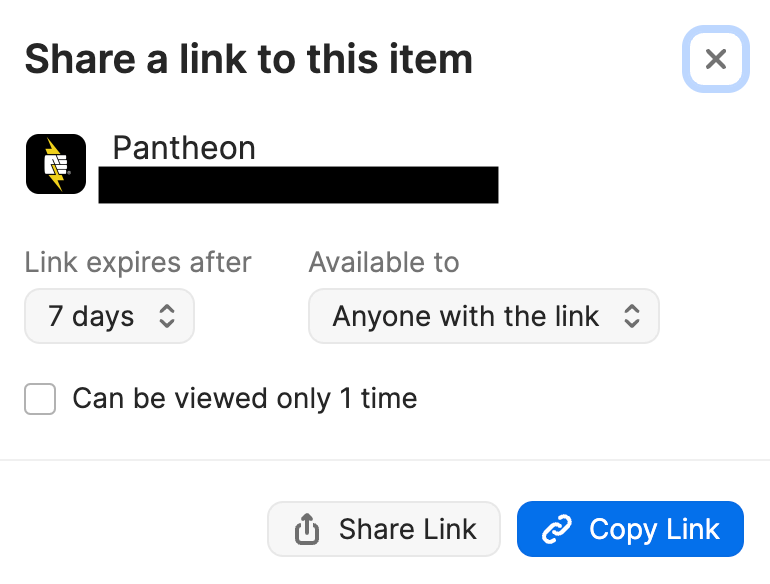
If you don’t have a password manager that can share logins securely, we recommend a free, easy-to-use alternative like onetimesecret.org, which lets you send a link to a secure page that shows your information once, then is deleted.
Delegate Access
While all your accounts should be owned by your organization, your partner agencies may occasionally need access to them in order to do their work.
Whenever possible, we recommend using delegated access: adding a trusted partner as an individual user on an account. This is preferable to sharing the account login because it bypasses any need to coordinate 2FA logins. It’s time-consuming and frustrating for everyone to have to coordinate logins with texts or emails to a particular person.
Delegated access isn’t available for every software or service, so pay attention to that feature when picking a password manager.
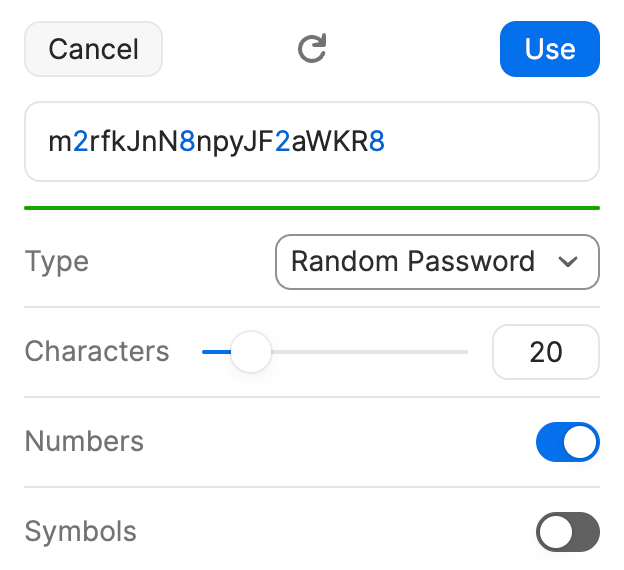
Password Generation
Another great aspect of 1Password is that it allows you to autogenerate a complex password complete with characters required directly within the program. You can generate the password, save it, and stop thinking about it.
Strong passwords are one of the most effective ways to protect your website, email, and other online services from hackers. A password manager takes care of the problem of having to remember and type out the long string of random characters that make up a strong password.
Credit Card Info
It isn’t just passwords that need to be stored securely and kept up to date. Credit cards can be another big part of keeping your digital platforms running. We always recommend keeping the card associated with each account bundled with the logins for easy and efficient organization.
Bundling Information in Your Password Manager
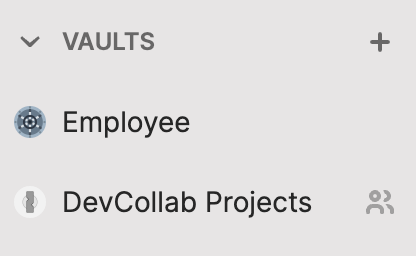
1Password organizes all your important information in what they call “vaults”. These are different sections within 1Password that house all pertinent information for one specific platform or service in one place.
A vault will bundle all the information for a single website, app or program together. This allows you to keep logins, credit cards, urls, notes, and more organized together.
1Password lets users input links directly into the platform. Adding the link to the login is a huge time-saver as well. We’ve all been stumped when trying to log in — only to realize we’re logging into the wrong place!
An added bonus is the browser plugin will take the url you’ve entered and automatically input your logins if you’ve done this. Most password managers will have this.
You can have your own private vault of 1Password for your logins as well as a shared vault that can be accessed by a group of users.
Nonprofit Pricing
As an agency that works exclusively with nonprofits, we’re always excited to see when we can help make their work more efficient and when we can help find them a good deal.
Bitwarden has a free plan that may suit your needs. 1Password is not free, but making room for it in your budget can far outweigh the cost of getting locked out.
If you’re a nonprofit interested in learning more about 1Password you may be eligible for discounted support. (Learn more about 1Password for nonprofits.)If a different password manager is a better fit and you prefer their paid plan, ask them about any nonprofit discounts they have.
For more tech tips and tricks check out our blog or reach out to us to learn more about what we do.
Leave a comment